| static | ||
| templates | ||
| .gitignore | ||
| app.py | ||
| balance.py | ||
| categorize_transactions.py | ||
| README.md | ||
| requirements.txt | ||
| transactions.py | ||

ING FinTS Auswertung
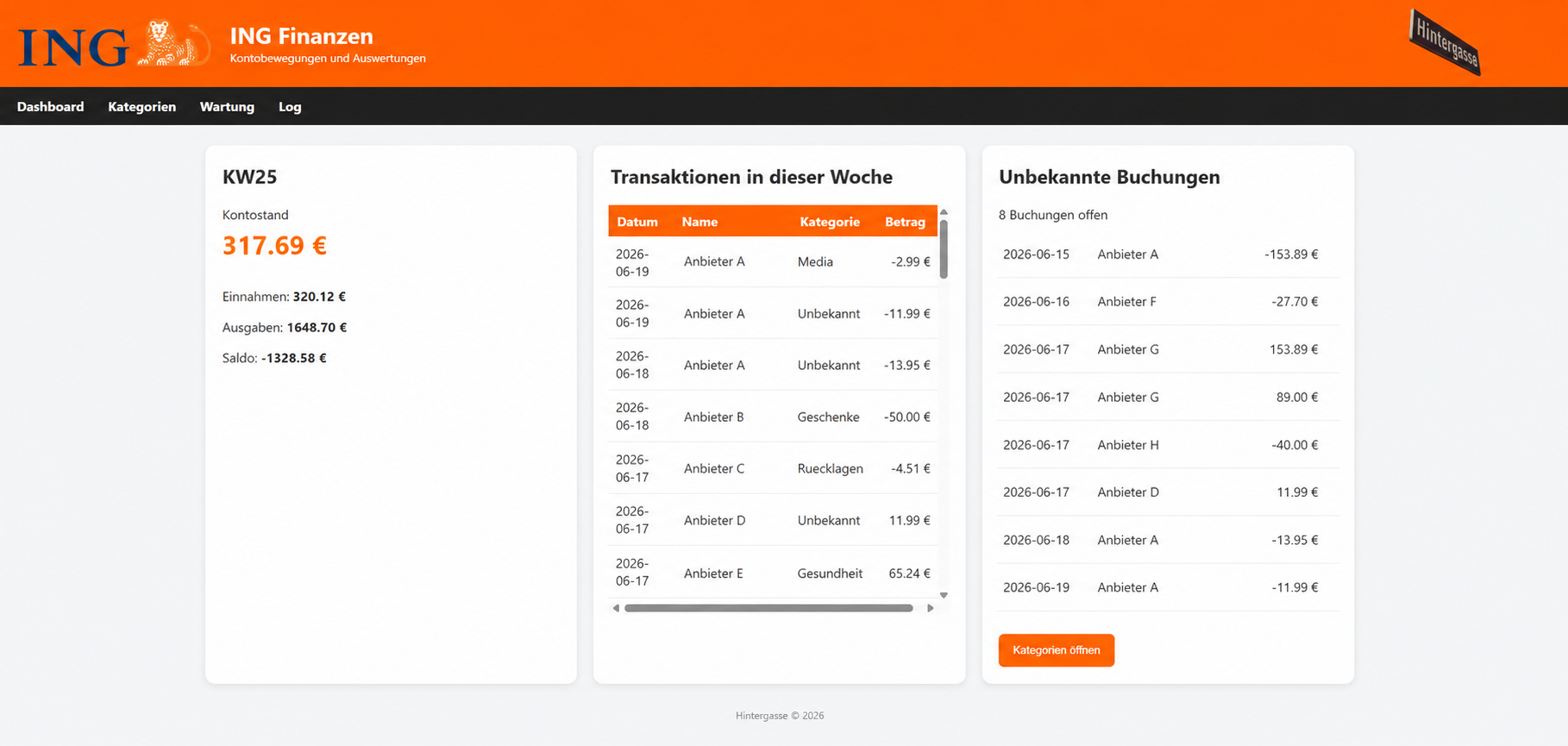 Python-Skripte und Web-Dashboard zur automatisierten Auswertung eines ING-Kontos über FinTS.
Funktionen
balance.py
- Aktuellen Kontostand abrufen
- Übertragung an ioBroker
- Logging
transactions.py
- Abruf der Kontobewegungen einer Kalenderwoche
- Export als CSV und JSON
- Übertragung von Kennzahlen an ioBroker
categorize_transactions.py
- Kategorisierung anhand von Kategorien.json
- Erzeugung von Auswertungen
- Erstellung der Excel-Jahresauswertung
Flask Web-Dashboard
- Dashboard mit aktueller Kalenderwoche
- Aktueller Kontostand aus ioBroker
- Kontostand-Ampel
- Einnahmen / Ausgaben / Saldo
- Transaktionen der aktuellen Woche
- Unbekannte Buchungen
- Kategorienverwaltung
- Wartungsbereich
- Log-Anzeige
Web-Dashboard
Dashboard
Anzeige von:
- Kontostand
- Einnahmen
- Ausgaben
- Saldo
- Transaktionen der aktuellen Kalenderwoche
- Unbekannte Buchungen
Unbekannte Buchungen
Alle Transaktionen mit Kategorie:
Unbekannt
werden in einer eigenen Kachel angezeigt.
Von dort kann direkt zur Kategorienverwaltung gewechselt werden.
Kontostand-Ampel
Konfigurierbar über:
BALANCE_YELLOW_DAY=15
BALANCE_YELLOW_LIMIT=400

BALANCE_RED_DAY=28
BALANCE_RED_LIMIT=300
Beispiel:
- ab Tag 15 und unter 400 € → Orange
- ab Tag 28 und unter 300 € → Rot
Wartung
Über die Weboberfläche können folgende Aktionen gestartet werden:
- Kontostand aktualisieren
- Transaktionen laden
- Kategorisierung starten
- Wochenupdate
Wochenupdate
Führt automatisch aus:
transactions.py
↓
categorize_transactions.py
Popup-Meldungen
Erfolgreiche Aktionen werden direkt im Dashboard angezeigt.
Verzeichnisstruktur
/home/banking
├── .ing.conf
├── logs
│   ├── balance.log
│   ├── transactions.log
│   └── categorize_transactions.log
│
├── ING
│   ├── app.py
│   ├── balance.py
│   ├── transactions.py
│   ├── categorize_transactions.py
│   ├── Kategorien.json
│   ├── templates/
│   ├── static/
│   └── README.md
│
└── Transaktionen
    └── YYYY
        ├── csv
        ├── json
        ├── categorized_csv
        ├── categorized_json
        ├── summary
        └── jahresauswertung
Konfiguration
Datei:
~/.ing.conf
Beispiel:
ING_USER=12345678
ING_PIN=geheim
ING_IBAN=DExxxxxxxx

IOBROKER_HOST=10.0.1.122
IOBROKER_PORT=8087

IOBROKER_DP_BALANCE=javascript.0.Variablen.Konto
IOBROKER_DP_TRANSACTIONS=javascript.0.Variablen.Konto_Transaktionen
IOBROKER_DP_WEEKSUM=javascript.0.Variablen.Konto_Wochensumme
IOBROKER_DP_WEEKEXPENSES=javascript.0.Variablen.Konto_Wochenausgaben

BALANCE_YELLOW_DAY=15
BALANCE_YELLOW_LIMIT=400

BALANCE_RED_DAY=28
BALANCE_RED_LIMIT=300
Installation
Repository klonen:
git clone https://git.hintergasse.de/hubobel/ING.git
Abhängigkeiten installieren:
pip install -r requirements.txt
Wichtige Befehle
Repository aktualisieren:
git -C ~/ING pull
Kontostand abrufen:
python3 ~/ING/balance.py
Transaktionen laden:
python3 ~/ING/transactions.py
Bestimmte Kalenderwoche laden:
python3 ~/ING/transactions.py 2026 25
Kategorisieren:
python3 ~/ING/categorize_transactions.py
Bestimmte Kalenderwoche kategorisieren:
python3 ~/ING/categorize_transactions.py 2026 25
Logging
Linux:
/home/banking/logs
Windows (PyCharm):
<Projektverzeichnis>/logs
Betriebssysteme
Linux
- Debian
- Ubuntu
- Proxmox VE
Windows
- Windows 11
- PyCharm
Die Skripte erkennen automatisch die Umgebung und verwenden passende Log- und Konfigurationspfade.
ioBroker
Verwendete Datenpunkte:
- Kontostand
- Anzahl Transaktionen
- Wochensumme
- Wochenausgaben
Der Kontostand wird zusätzlich im Dashboard angezeigt.
Lizenz
Privates Projekt.